Schedule a Free Demo
No obligation • Takes less than a minute
CMMS System Integration & API Software
CMMS System Integration connects your maintenance management software to your existing business systems — ERP, accounting, IoT sensors, BMS, and more — so data flows automatically between platforms, eliminating duplicate entry, data silos, and manual hand-offs that slow your team down.
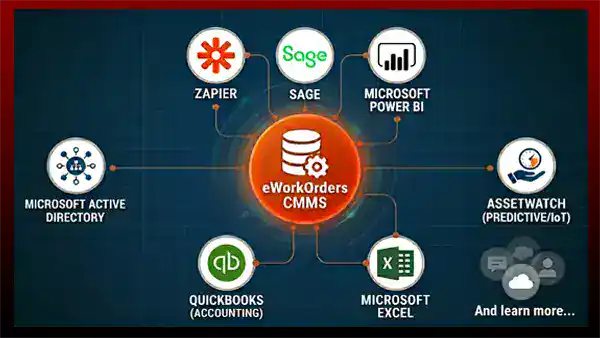
eWorkOrders CMMS connects to the systems your operation already runs — from QuickBooks and SAP to Microsoft Power BI, Zapier, AssetWatch IoT sensors, and your building automation platform — so maintenance data flows where it needs to go, automatically, in real time.
No more data silos. No more manual exports. Just one connected maintenance operation that runs smarter.
Customers Love Us!















How eWorkOrders Connects to Your Systems
Three integration pathways — built for maintenance operations of every size.
Connect Your CMMS to Every System Your Operation Runs On
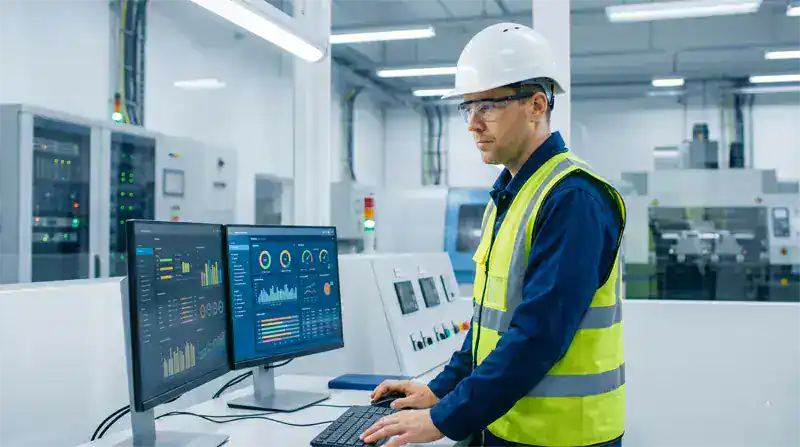
eWorkOrders offers a full REST API that acts as a two-way bridge between your CMMS and any application in your technology stack. Whether you're connecting to an ERP like SAP or Oracle, a building management system (BMS), IoT predictive maintenance sensors, or a financial platform, the eWorkOrders API enables automated, real-time data exchange without manual re-entry.
Several eWorkOrders customers have integrated live runtime hours and equipment condition alarms directly from their facility automation systems to auto-trigger preventive maintenance work orders — eliminating calendar-based guesswork and replacing it with condition-based precision.
One Login. Full Access. Zero Password Management Headaches.
eWorkOrders Single Sign-On (SSO) integrates with Microsoft Active Directory and other enterprise identity providers so your team logs in once — to their computer or corporate portal — and has immediate, role-appropriate access to eWorkOrders without a separate username or password.
For IT teams managing 50 or 500 maintenance users, SSO eliminates the password reset cycle, enforces your corporate security policies automatically, and ensures that when an employee leaves, their CMMS access is revoked the moment their corporate account is deactivated — no separate offboarding step required. According to Verizon's Data Breach Investigations Report, over 80% of hacking-related breaches involve weak or compromised passwords — SSO directly eliminates that attack surface.[1]
1 Verizon. Data Breach Investigations Report (DBIR). verizon.com/business/resources/reports/dbir/

Your Maintenance Data, in Every Platform Your Leadership Uses
eWorkOrders exports any data set — work orders, asset history, labor costs, parts usage, and PM compliance — directly to Microsoft Excel in a single click. Scheduled exports deliver fresh data to your inbox or shared drive automatically every morning.
For organizations running Microsoft Power BI, Sage, or custom analytics platforms, eWorkOrders connects via API to stream live maintenance KPIs directly into your existing dashboards. Management gets the MTTR, MTBF, cost-per-asset, and compliance data they need in the tools they already use — without logging into CMMS at all.

Let Your Equipment Tell Your CMMS When It Needs Service
eWorkOrders integrates with AssetWatch and other IoT condition monitoring platforms to receive real-time equipment data — vibration, temperature, runtime hours, and more — and automatically create maintenance work orders the moment a threshold is crossed.
This is the practical definition of predictive maintenance — your assets generate the maintenance signal, eWorkOrders converts it into a work order with parts reserved and a technician assigned, and the job is underway before any failure occurs. According to the U.S. Department of Energy, predictive maintenance programs deliver an 8–12% cost savings over preventive maintenance schedules and a 25–30% reduction in maintenance costs overall.[2]
Explore the AssetWatch Integration →
2 U.S. Department of Energy. Operations & Maintenance Best Practices Guide, Version 3.0.
What Is CMMS System Integration?
CMMS system integration is the process of connecting your Computerized Maintenance Management System to other business-critical platforms — ERP, financial software, IoT sensors, HR systems, building management systems (BMS), GIS, and more — so data flows automatically between them without manual re-entry or file exports. According to MuleSoft's 2022 Connectivity Benchmark Report, only 28% of enterprise applications are integrated on average — meaning 72% of operational data remains locked in silos, inaccessible to the rest of the business.
For maintenance managers, integration means that a work order closed in eWorkOrders can automatically update asset costs in your ERP, deduct inventory in your accounting system, and push KPI data to your executive dashboard — all without anyone touching a keyboard. For technicians, it means IoT sensor data from their equipment automatically generates the work order, reserves the parts, and sends them the job before anyone makes a phone call.
What is an API in CMMS context? An Application Programming Interface (API) is a standardized connection point that lets two software systems share data automatically. eWorkOrders provides a documented REST API that developers or IT teams can use to connect any compatible business system — including ERPs, accounting platforms, IoT devices, Zapier workflows, and custom-built applications — to your CMMS without replacing existing infrastructure.
See eWorkOrders Connected to Your Systems — Live Demo, No Commitment
Our US-based team will demonstrate the specific integrations that matter most for your operation — ERP, IoT, SSO, or accounting.
Supported Integrations — Every Platform, Every Direction
eWorkOrders connects to the systems your organization already runs — out of the box and via API for custom connections.
| Integration | Platform Examples | Type | What eWorkOrders does with it |
|---|---|---|---|
| ERP SystemsEnterprise Resource Planning | SAP, Oracle, Microsoft Dynamics | API | Syncs work order costs, asset records, and purchase orders automatically — no duplicate data entry between maintenance and finance teams. |
| Accounting SoftwareFinancial Platforms | QuickBooks, Sage | API / Export | Parts costs, labor hours, and purchase orders flow to accounting automatically on work order close. Eliminates manual invoice reconciliation. |
| IoT & Condition MonitoringPredictive Maintenance | AssetWatch, vibration, temp sensors | Live Feed | Condition threshold breaches automatically create PM work orders in eWorkOrders — with parts reserved and technician assigned. Zero human trigger required. |
| Identity / SSOAuthentication Platforms | Microsoft Active Directory and enterprise identity providers | SSO | Users log in once with corporate credentials. Access provisioned and revoked automatically with HR system changes. Full audit trail maintained. |
| BI & ReportingBusiness Intelligence | Microsoft Power BI, Tableau | API / Stream | Live maintenance KPIs — MTTR, MTBF, PM compliance, cost-per-asset — stream directly into executive dashboards without manual exports or logins. |
| Workflow AutomationNo-Code Integrations | Zapier (5,000+ connected apps) | Zapier | Build custom workflows connecting eWorkOrders to Slack notifications, Google Sheets, email platforms, HR systems, and thousands of other apps without writing code. |
| Data ExportSpreadsheet & Analysis | Microsoft Excel | Scheduled Export | Any eWorkOrders data set — work orders, asset costs, labor, inventory — exports to Excel in one click or on an automated schedule for further analysis. |
Custom integration needs? We build to your requirements.
eWorkOrders has a proven track record of building custom API integrations to meet unique enterprise requirements — from GIS mapping platforms to building automation controllers to proprietary fleet management systems. Our US-based technical team works directly with your IT team to scope, build, and support any integration your operation needs. No offshore development. No third-party SI required.
Every Integration Capability Your Operation Needs
From API connections to no-code Zapier workflows, eWorkOrders meets your team where your technology stack already lives.
Open, documented REST API for reading and writing data between eWorkOrders and any compatible platform. Supports work orders, assets, parts inventory, labor records, and KPIs in both directions.
Certified integration with AssetWatch continuous condition monitoring. Vibration, temperature, and runtime readings auto-create work orders in eWorkOrders the moment a threshold is crossed.
Maintenance costs, parts purchases, and labor hours flow directly to QuickBooks from closed work orders — eliminating manual re-entry and keeping maintenance spend reconciled with your books in real time.
Stream live maintenance KPIs — MTTR, MTBF, PM compliance, backlog age, cost-per-asset — directly into your Power BI dashboards. Leadership gets the data they need without logging into the CMMS.
Connect eWorkOrders to Slack notifications, Google Workspace, HR platforms, email tools, and thousands of other applications through Zapier — no coding required. Build custom automation workflows in minutes.
Enterprise SSO compatible with Microsoft Active Directory and other enterprise identity providers. One login for your entire software stack. Automatic access provisioning and instant revocation on offboarding.
Connect eWorkOrders to your Geographic Information System to visualize asset locations, work order density, and maintenance activity on a spatial map — critical for utilities, municipalities, and distributed facilities.
Integrate eWorkOrders with your building automation or BMS platform to receive equipment alarms directly as work orders — HVAC faults, door access failures, fire suppression alerts — automatically routed to the right technician.
Connect live meter readings from fleet odometers, production counters, and equipment hour meters to trigger PM work orders automatically when service thresholds are reached — no manual meter entry required.
Any data set in eWorkOrders — work orders, assets, labor, parts usage, compliance records — exports to Excel on a daily, weekly, or monthly schedule. Delivered automatically to your inbox or shared drive.
The eWorkOrders AI Assistant draws on your integrated asset history, repair records, and connected IoT data to suggest troubleshooting steps, recommend parts, and identify recurring failure patterns across your equipment fleet.
Need a connection that isn't on this list? Our US-based team has built custom integrations for proprietary fleet systems, legacy ERPs, state government platforms, and more. We scope, build, and support the integration — no third-party SI required.
The 6 Stages of CMMS Integration Maturity
Most maintenance operations don't go from zero to fully integrated overnight. Here is where organizations typically are — and where eWorkOrders takes them.
Maintenance data lives in spreadsheets, email chains, and paper logs. Work orders are created manually. Financial data is re-entered by hand into accounting. IoT alarms are emailed to a supervisor who creates the work order manually. Every system is an island. This is where most organizations start — and where the cost of disconnection is highest.
A CMMS is in place and work orders are tracked digitally. PM schedules run automatically. But the CMMS is not connected to anything else — costs still get re-entered into accounting, reports are still exported manually to spreadsheets, and every user still has a separate CMMS login. The maintenance operation is organized, but isolated.
The first integrations go live. SSO eliminates separate CMMS logins — technicians and managers authenticate through Active Directory. Scheduled Excel exports deliver maintenance reports to management automatically every morning. The manual login and reporting burden is gone, but data still flows one direction on a schedule rather than in real time.
Work order costs, parts purchases, and labor hours flow automatically to QuickBooks, Sage, or ERP systems on work order close. Purchase orders sync automatically. Maintenance spend is reconciled with the general ledger in real time — no manual re-entry, no month-end data cleanup. Finance and maintenance are finally speaking the same language.
Maintenance KPIs stream live into Power BI — MTTR, MTBF, PM compliance, and cost-per-asset update in real time without anyone running a report. IoT sensors feed condition data directly into eWorkOrders — when a reading crosses a threshold, a work order is created automatically with parts reserved and the right technician assigned. Maintenance becomes proactive rather than reactive.
The maintenance operation is fully connected. IoT sensors create work orders. ERP and accounting stay current automatically. Leadership sees live maintenance KPIs in the dashboards they already use. SSO manages access across the entire organization. GIS maps assets across facilities. Custom Zapier workflows handle the edge cases. This is the integrated maintenance operation — and it is where eWorkOrders takes you.
Why Maintenance Teams Choose eWorkOrders for Integration
30 years of enterprise integration experience — without the enterprise price tag or implementation timeline.
API access, SSO, and Excel Export are included in Advanced and Enterprise plans — not sold as add-on modules with separate licensing. You get full integration capability as part of your subscription. See all plans →
Every custom integration is scoped, built, and supported by eWorkOrders' own US-based technical team. No offshore handoffs. No third-party system integrators. Direct access to the people who built the software.
Standard integrations — QuickBooks, Active Directory SSO, Excel export, Zapier — activate within days of go-live. Custom API integrations are scoped and delivered on timelines measured in weeks, not months-long implementation projects.
Founded 1995. We've integrated CMMS with government, manufacturing, healthcare, utilities, and enterprise systems that other vendors say can't be done. 120+ awards. 4.9 stars on Capterra.
Integration questions get answered by the people who built the integration — not Tier 1 support reading from a script. U.S.-based technical team responds within hours for integration issues, not days.
All API connections are secured with token-based authentication, HTTPS encryption, and role-based access controls. SSO integrations support multi-factor authentication (MFA) and comply with enterprise security policies. Independently rated by SecurityScorecard.
Common Integration Challenges and How eWorkOrders Solves Them
Disconnected systems are one of the most expensive and least visible problems in maintenance operations. According to MuleSoft, organizations use an average of 976 applications but only 28% of them are integrated — meaning 72% of the data in those systems is inaccessible to the rest of the business. For maintenance teams, that means asset data living in one system, financial data in another, and work order history in a third — with a human manually moving information between them every day. eWorkOrders eliminates that entirely.

Duplicate Data Entry Between Systems
When maintenance and financial systems don't talk to each other, someone has to manually re-enter work order costs, purchase orders, and parts usage into accounting — a process prone to errors and delays. eWorkOrders' API eliminates re-entry entirely by pushing that data automatically on work order close.
95% of organizations report facing integration challenges — and those that integrate their systems report significantly fewer data reconciliation errors and lower IT operating costs (MuleSoft Connectivity Benchmark Report 2025).
IoT Alarms That Don't Become Work Orders
Many organizations have invested in IoT condition monitoring but still rely on a person reading an alert email and manually creating the work order — introducing delays that turn a warning into a failure. eWorkOrders' integration with AssetWatch and other sensor platforms removes that human step entirely.
Predictive maintenance programs reduce maintenance costs by 25–30% and cut equipment breakdowns by up to 70% compared to reactive maintenance approaches (U.S. Department of Energy).
Password Sprawl and Security Risk
Maintenance teams with 50+ technicians across multiple shifts create enormous IT overhead when every application requires a separate login. Worse, departed employees often retain access for weeks because offboarding doesn't include every system. eWorkOrders SSO ties access to your corporate identity provider — access ends the moment the employee account is deactivated.
Over 80% of hacking-related breaches involve compromised passwords — SSO directly eliminates that attack surface (Verizon DBIR).
Management Reports Built in Spreadsheets
When CMMS data doesn't flow to the BI tools executives use, maintenance managers spend hours each week exporting, cleaning, and formatting reports manually. eWorkOrders API connections to Power BI, Sage, and custom platforms make those reports self-updating — management gets live data without anyone touching a spreadsheet.
Only 28% of enterprise applications are integrated on average — leaving the majority of operational data inaccessible across business systems (MuleSoft Connectivity Benchmark Report 2022).
CMMS Integration for Every Industry
The integration challenge is universal. The specific systems you need to connect depend on your industry.
Connect CMMS to ERP systems like SAP and Oracle, IoT vibration and temperature sensors on production equipment, and OEE reporting platforms. IoT-triggered work orders prevent line stoppages before they happen.
Integrate with HRIS for SSO, BMS for HVAC and life safety alerts, and compliance reporting platforms. Work order records auto-populate JCAHO and Joint Commission documentation requirements.
SCADA and process control integration for pump stations, treatment equipment, and flow meters. GIS integration maps asset locations across service territories. Audit records maintained automatically.
Integration with government financial and procurement systems, GIS platforms for infrastructure asset management, and Active Directory SSO for enterprise security. DTH / Virginia DOT saved $150K+ annually.
DCS and SCADA integration for turbine, generator, and transformer monitoring. IoT condition readings create work orders automatically. Compliance records maintained in the audit trail.
BMS, BACnet, and Modbus integration for building automation alarms. Active Directory SSO for enterprise tenants. QuickBooks and Sage integration for maintenance cost reporting to property owners.
Proven Results — Real Customers
"Before they implemented eWorkOrders, VDOT was managing multiple systems, with multiple platforms. With the eWorkOrders CMMS solution, they have all of their inventory and asset information, documents, schedules, and information stored in one centralized location that can be accessed from anywhere, at any time."

Carmel

Streamlined Maintenance, Better Communication & KPI Insights with eWorkOrders
The use of the eWorkOrders platform has facilitated the management and streamlining of our operations and maintenance workflow. System features, coupled with the responsiveness of the eWorkOrders tec...

Streamlined Maintenance, Better Communication & KPI Insights with eWorkOrders
The use of the eWorkOrders platform has facilitated the management and streamlining of our operations and maintenance workflow. System features, coupled with the responsiveness of the eWorkOrders technical team to custom solutions, have enabled our company to increase productivity and efficiency, integrate data with other systems, improve facility maintenance communications, streamline our business processes, and perform continuous process improvement benchmarking through KPI analysis.
Carmel

Rhett

Saved $150,000! eWorkOrders Understands Customer Requirements
eWorkOrders saved my client (Virginia Department of Transportation) over $150,000 a year in headcount alone! Before they implemented eWorkOrders, VDOT was managing multiple systems, with multiple plat...

Saved $150,000! eWorkOrders Understands Customer Requirements
eWorkOrders saved my client (Virginia Department of Transportation) over $150,000 a year in headcount alone! Before they implemented eWorkOrders, VDOT was managing multiple systems, with multiple platforms. Being a government facility, they are very conscious of budgets and expenses. With the eWorkOrders CMMS solution, they have all of their inventory and asset information, documents, schedules, and information stored in one centralized location that can be accessed from anywhere, at any time! Through the implementation and the ease of use of eWorkOrders CMMS centralized solution, they no longer needed multiple people managing multiple legacy systems and were able to reduce their headcount and utilize these employees in another area. Overall, the system saved time, money, and increased productivity and efficiency.
It has been great working with the eWorkOrders Team! They understood my customers’ needs and requirements, budget constraints, and worked with them to quickly get them up and running on the software.
I highly recommend this team for any company that really wants to achieve success with a new CMMS solution. It is really nice to work with a team that listens to what you want and need and delivers a solution with an exceptional outcome! eWorkOrders is in the business of successfully assisting organizations through the implementation process and making sure that customers are comfortable with their system. eWorkOrders has the best professional, technical, and management team who all work together to ensure customer satisfaction!
Rhett

Pam

The Perfect Affordable, Reliable, Secure and Easy-To-Use CMMS
Managing the facilities for the US Senate Sergeant at Arms across a large complex requires a lot of time and organization. Above all, it has to be affordable, increase efficiency, reduce costs, and b...

The Perfect Affordable, Reliable, Secure and Easy-To-Use CMMS
Managing the facilities for the US Senate Sergeant at Arms across a large complex requires a lot of time and organization. Above all, it has to be affordable, increase efficiency, reduce costs, and be completely secure. Implementing eWorkOrders streamlined processes, improved inspections, and provided us with daily reports on how our operations were performing. Overall, we are extremely satisfied with eWorkOrders, and I would highly recommend them to anyone looking for a web-based CMMS.
Pam
Ready to Connect Your Maintenance Systems?
Calculate exactly how much disconnected systems are costing your operation — free, no email required.
Common Questions About CMMS System Integration
What maintenance managers and IT teams ask most before connecting their systems.
What is CMMS system integration?
CMMS system integration is the process of connecting your Computerized Maintenance Management System to other business platforms — ERP, accounting software, IoT sensors, building management systems, identity providers, and BI tools — so that maintenance data flows automatically between systems without manual re-entry or file exports. In practice, it means a work order closed in eWorkOrders can update your ERP, deduct inventory, push costs to accounting, and refresh your executive dashboard — all without anyone touching a keyboard.
What systems does eWorkOrders integrate with?
eWorkOrders integrates with ERP platforms (SAP, Oracle, Microsoft Dynamics), accounting software (QuickBooks, Sage), IoT condition monitoring (AssetWatch), identity providers (Microsoft Active Directory and enterprise identity providers), BI tools (Microsoft Power BI), workflow automation (Zapier — 5,000+ connected apps), GIS platforms, building management systems, and Microsoft Excel for scheduled data exports. Custom integrations are available for systems not on this list.
How does eWorkOrders API integration work?
eWorkOrders provides a documented REST API with endpoints for reading and writing work orders, assets, parts inventory, labor records, and KPIs. Your IT team or eWorkOrders' US-based technical team configures the connection between eWorkOrders and your target system. Once active, data flows automatically — triggered by events like work order creation, status change, or closure — without manual intervention. The API supports both push (eWorkOrders sends data) and pull (your system requests data) patterns.
Can IoT sensors automatically create work orders in eWorkOrders?
Yes. eWorkOrders has a certified integration with AssetWatch continuous condition monitoring and supports connections with other IoT platforms via API. When a sensor reading exceeds a defined threshold — vibration, temperature, pressure, runtime hours — eWorkOrders automatically creates a work order, attaches the asset's maintenance history and procedure checklist, reserves any required parts from inventory, and routes the job to the appropriate technician. No human trigger required.
What is Single Sign-On (SSO) and does eWorkOrders support it?
Single Sign-On (SSO) allows users to log in to eWorkOrders using their existing corporate credentials — the same username and password they use for their computer, email, and other enterprise applications. They log in once and have immediate, role-appropriate access to eWorkOrders without a separate password. eWorkOrders supports SSO integration with Microsoft Active Directory and other enterprise identity providers. Access is provisioned and revoked automatically based on your HR system, so offboarding eliminates CMMS access instantly.
How long does it take to set up integrations?
Standard integrations — Active Directory SSO, QuickBooks, Excel export, and Zapier workflows — can be configured within days of go-live. Custom API integrations with ERP systems, IoT platforms, or building management systems are scoped individually and typically delivered in 2 to 8 weeks depending on complexity. eWorkOrders' US-based technical team handles the integration directly — no third-party system integrators required.
Is the eWorkOrders API secure?
All eWorkOrders API connections use token-based authentication, HTTPS/TLS encryption, and role-based access controls that limit what each integration can read or write. API tokens are scoped to the minimum permissions required for each integration — following the principle of least privilege. eWorkOrders maintains one of the highest independent security ratings in the CMMS industry, as verified by SecurityScorecard. SSO integrations support multi-factor authentication (MFA) enforcement through your identity provider.
Does eWorkOrders integrate with QuickBooks?
Yes. eWorkOrders integrates directly with QuickBooks to push maintenance costs — parts purchases, labor hours, purchase orders, and work order expenses — to your accounting system automatically when work orders are closed. This eliminates the manual re-entry of maintenance costs into QuickBooks and keeps your maintenance spend reconciled with your books in real time. The integration works with QuickBooks Online and QuickBooks Desktop.
Which eWorkOrders plans include API and integration features?
API access, SSO, and Excel Export are available on the Advanced ($480/mo, unlimited users) and Enterprise (per-user, starting at $45/user) plans. Standard data export and reporting is available across all plans. IoT integrations, GIS connectivity, custom API development, and advanced enterprise integration features are available on the Enterprise plan. No additional integration licensing fees are charged on top of your subscription.
System Integration & CMMS Resources
Guides, tools, and documentation to help your team connect your maintenance operation.













Connect Your Entire Maintenance Operation
Join Honda, Virginia DOT, McDonald's, and thousands of maintenance teams who've eliminated data silos with eWorkOrders. Get a live demo of the specific integrations your operation needs.
All third-party statistics are sourced from publicly available, independently published industry research and are cited with direct source links. Capterra, G2, GetApp, and Software Advice badge imagery is the intellectual property of their respective owners, displayed consistent with each platform's standard badge-use policies. eWorkOrders images used on this page are owned by Information Services Group LLC and used with permission. eWorkOrders® is a registered trademark of Information Services Group LLC. Product names including SAP, Oracle, Microsoft Dynamics, QuickBooks, Sage, Microsoft Power BI, Microsoft Active Directory, Zapier, AssetWatch, and Tableau are the trademarks of their respective owners. eWorkOrders has no affiliation with those companies and does not imply sponsorship or endorsement by them. No competitor names or trademarks are referenced on this page. |
1. Verizon. Data Breach Investigations Report (DBIR). |
2. U.S. Department of Energy. Operations & Maintenance Best Practices Guide, Version 3.0. |
3. MuleSoft. Connectivity Benchmark Report 2022 — 70% of Organizations Do Not Provide Completely Connected User Experiences. |
4. MuleSoft. Connectivity Benchmark Report 2025 — 95% of Organizations Face Integration Challenges. |
5. Aberdeen Research, via IIoT World. The Actual Cost of Downtime in the Manufacturing Industry — $260,000 per hour.


